
Here is a pattern worth sitting with. If you plotted a developer’s real output over a year of adopting AI, you would not see a clean upward line. You would see something that shoots up fast, plateaus into a mess, and then descends into something that finally ships. The first few months feel incredibly productive — you generate enormous amounts of code — but “felt productive” and “was productive” turn out to be very different things. Most of what comes out of that window is slop: code that looks like progress and behaves like debt.
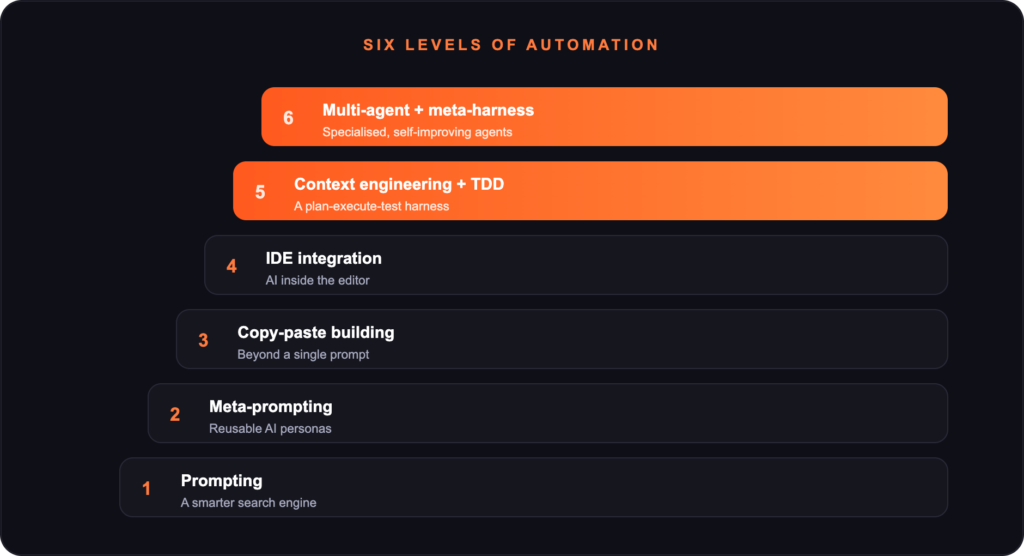
The real story is a ladder of six stages, and the single most important lesson is this: every stage is earned by hitting the wall of the one before it. You do not graduate to the next level because someone tells you to — you graduate because the current level stops working. So do not skip ahead. Learn to recognise the wall.
The six stages
1. Prompting
You open ChatGPT or Claude, ask a question, get an answer, iterate. It is a smarter search engine — knowledge access, drafting, debugging. The wall: manual prompt-writing does not scale. Every task needs the same boilerplate (“act as a senior engineer,” “respond in markdown,” “consider edge cases”), and your output is only as good as your prompt — and writing good prompts is a skill, not a default.
2. Meta-prompting
So you stop writing prompts directly: you describe the goal and let the AI generate the prompt, building reusable personas (Gems, custom GPTs, Projects). The wall: every new project still needs a persona built from scratch, and bigger codebases need more than a single persona can hold. The copy-paste round-trips start to pile up.
3. Copy-paste building
Copy a file from your editor, paste it into the model, ask for changes, paste it back. Crude, but it builds beyond what a single prompt can hold — real applications, real iteration. The wall: the friction is relentless. Every change is four manual steps, context resets between sessions, and errors compound silently. Worst of all, you are the integration layer — the slowest component in your own pipeline.
4. IDE integration
The AI moves inside the editor (Cursor, Antigravity). Tab-complete becomes “complete this function,” multi-file edits happen in one shot, and the copy-paste tax disappears. Velocity feels enormous. The wall — and this is the most dangerous one — is the highest risk of slop. The gains feel so real that you just keep going, but underneath there are repeated functions, no tests, and you are barely shipping. The wall stays invisible until your releases start breaking — a codebase can balloon from 10K to 200K lines in weeks, the same logic living in three different places. It feels like flying; it is a crash in slow motion.
5. Context engineering + TDD + a harness
This is the turn. You stop letting the AI see everything and start passing it only what it needs. You bake in constraints, you test under fire, and you wrap the AI in scaffolding — a plan → execute → test loop, every single time. Concretely: test-driven development (tests first, racing ahead of releases instead of chasing them), context engineering (KISS, DRY, minimal context fed to the model), per-prompt rules for the coding agent, and the harness itself. The result is counterintuitive: the codebase shrinks — in one case from 200K to 40K lines (half source, half tests) — with quality grades, cost metrics and execution traces on top, and releases that stop breaking. That descent on the graph is not a loss of productivity. It is the productivity.
6. Multi-agent + meta-harness
Eventually one model is not enough. You assign specialised agents per concern — a developer agent that writes code, a project-management agent that tracks state and deliverables, a proposal agent that drafts business and technical documents, a research agent that builds a knowledge graph — and the harness begins improving itself from its own audit trail. Two ideas make this stage work. The meta-harness: the audit trail becomes a learning mechanism, so the system improves from real failure data rather than guesses. And multi-model routing: a top model for planning and design, a mid-tier model for coding and drafting, a small fast model for status dashboards — matching the model to the job instead of paying for the biggest model every time.
Three ideas to leave with
- Think in systems and processes, not tasks. Automating a workflow starts with naming the system, not firing off a clever prompt. Ad-hoc AI use is not automation.
- Build for the friction you actually face — not the friction you imagine you will face someday. Every stage above is earned; when you hit a wall, that is the signal to climb. Until then, the tool you have is the right one.
- Always measure. Lines of code, tokens, cost, release cadence, test coverage. Without measurement you cannot tell slop from value — or a real wall from simply being tired.
At Orthonity we help teams climb this ladder deliberately, replacing one-off AI use with structured, tested, measured automation that turns short-term speed into systems you can actually build on.